Adding An Alert Bar Using Astra Pro
MrkWP has a great resource for adding a Notification / Alert Bar at top of a website using Astra Pro’s Custom Layouts: https://www.mrkwp.com/2020/04/making-a-covid19-notification-bar-with-astra-pro/
MrkWP has a great resource for adding a Notification / Alert Bar at top of a website using Astra Pro’s Custom Layouts: https://www.mrkwp.com/2020/04/making-a-covid19-notification-bar-with-astra-pro/

Graphic designer since before the Internet. Started with newspaper paste-up; then art director for advertising agency in Reno, NV; and now freelancer designing marketing materials, print-on-demand t-shirt art, websites, and social media graphics.
Over the past few years I’ve used the following WordPress Frameworks: PageLines Framework 2.x Drag-and-drop layout via the back-end. This version is no longer the star-child for PageLines, and they’ve moved on to DMS (below). PageLines DMS 2 This is the new kid on the PageLines block. 100% Responsive drag and drop system for WordPress. All…

PSD-to-WordPress conversion via WP Twenty Eleven child theme. (Two notes: 1) I produced about 70% of this site on The New iPad (v3). 2) This post is more for my own notes rather than a tutorial, so there may be small gaps in the knowledge.) Client: Body Conceptions by Mahri Relin Website design: Brad Egnor…
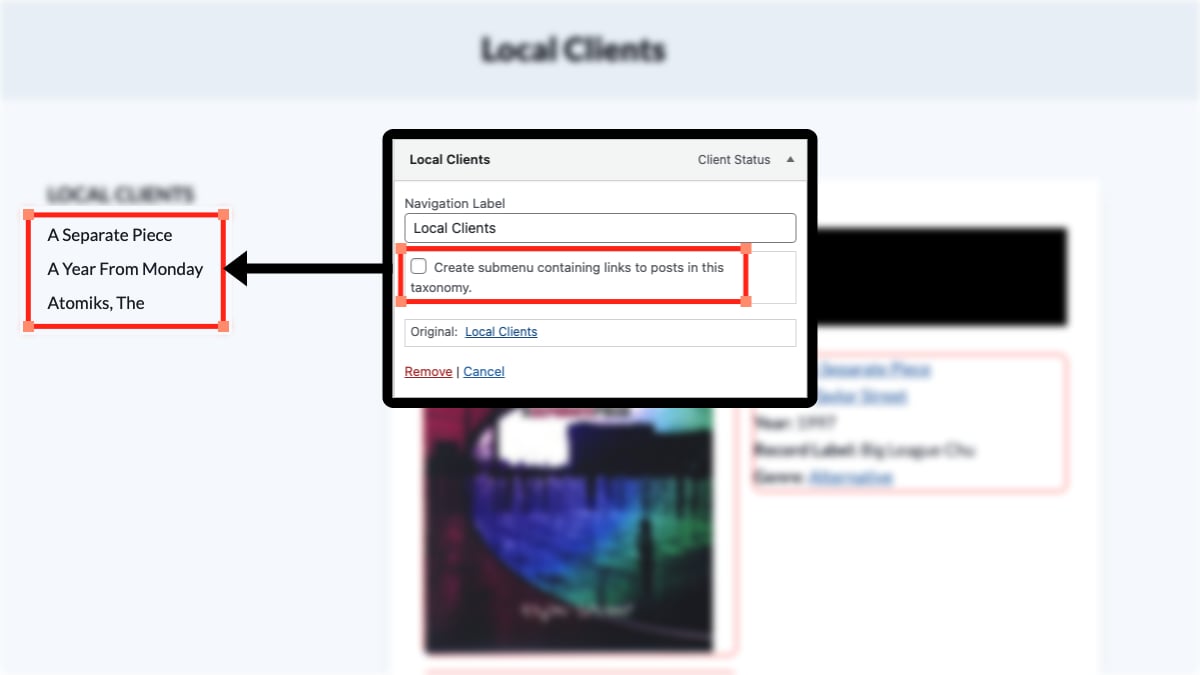
Very cool plugin from By Diana Koenraadt. Plugin replaces selected Category links / Post Tag links / Custom taxonomy links in a Custom Menu by a list of their posts/pages. I created a Custom Post Type (CPT) called “Clients” and a Custom Taxonomy called “Client Status.” Then, within the Client Status custom taxonomy, I created 2…
A fantastic WordPress SEO training video titled “SEO Mistakes Most Bloggers Make” by Stephan Spencer at WordCamp 2008 San Francisco. Very detailed. Also, download the associated Power Point presentation that he mentions at the beginning of the video: SEO Mistakes by Stephan Spencer SEO Mistakes Most Bloggers Make – WordPress SEO training video
Remove the word “Protected:” from title text of password-protected pages. Big thanks to t31os on the WordPress forums. Check out t31os’s site for more WordPress tips. The following filter function code is placed in the functions.php file, this way it doesn’t accidentally get replaced when WordPress is upgraded. <?php function the_title_trim($title) { $pattern[0] = ‘/Protected:/’;…
Problem: I now have 4 products in my WP e-Commerce shopping cart and want to move the 4th product to the first position. Warning: These instructions are from Aug 2010 (which is forever-ago in Internet terms) and may be out-of-date! Solution: On the WP e-Commerce admin page (labeled “Store” in WordPress’s admin), click on the…