Graphic designer since before the Internet. Started with newspaper paste-up; then art director for advertising agency in Reno, NV; and now freelancer designing marketing materials, print-on-demand t-shirt art, websites, and social media graphics.
Similar Posts
WordPress: Center navigation for PlatformPro framework
PlatformPro’s WordPress framework comes standard with flush-left navigation. We wanted the menu to be centered. We’re working with PlatformPro’s child theme, PlatformBase. WordPress version: 3.1.2 PlatformPro version: 1.3.5 PlatformBase version: 1.3.2 Add the following CSS to PlatformBase’s “base.css” file: #nav_row ul{padding-bottom:10px !important;float:none !important;text-align:center;} #primary-nav li{float:none !important;display:inline !important;} #primary-nav a{float:none !important;display:inline !important;} http://www.pagelines.com/forum/topic/5906 (must be logged…
Event Calendar WordPress Plugins
Client’s specs include displaying Today’s Events and Upcoming Events in the sidebar, in separate Widgets. Let the Event Calendar WordPress Plugins search begin. Currently using WordPress 3.5.2. The Events Calendar (v 3.0) Widget: Upcoming events Note: this only shows Upcoming events, NOT Today’s events Compatible up to: 3.6 Last Updated: 2013-7-2 Downloads: 438,550 4 out of…
How to Add Custom Navigation Menus in WooThemes Canvas
How to add custom navigation menus in WooThemes Canvas, via Child Theme*. In this case, I wanted to add a menu in the footer and this tutorial is perfect. CSS for centering the footer menu (for Canvas v5.3.0 Child Theme): *Follow instructions to setup and use a WooThemes Canvas Child Theme.
Free WordPress Themes: 2011 Edition – Smashing Magazine
Most of the Free WordPress Themes in Smashing Magazine’s 2011 Edition can be tailored via the options panel to be anything you want, whether a portfolio, a content-heavy magazine-style website or a basic blog.
WooCommerce | WooTicket | WordPress | WordPress Ecommerce | WordPress plugins | WordPress shopping cart | WordPress Shopping Cart PluginWooTicket – Display Ticket Event in WooCommerce Shop
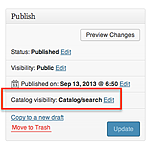
This can only be done in the WooCommerce Products section, NOT in the The Events Calendar ticket section. Under WooCommerce Products, change the events’ Catalog visibility from hidden to whatever visibility you want. THIS IS VERY IMPORTANT! If you don’t, the WooTicket ticket will only show on your event calendar, and not in your WooCommerce store.*…