Remove Background With Remove.bg
This is VERY helpful when I find an image that I want to print on a t-shirt, but I need to first strip out the background and make the background transparent. Remove.bg is excellent.

This is VERY helpful when I find an image that I want to print on a t-shirt, but I need to first strip out the background and make the background transparent. Remove.bg is excellent.

Graphic designer since before the Internet. Started with newspaper paste-up; then art director for advertising agency in Reno, NV; and now freelancer designing marketing materials, print-on-demand t-shirt art, websites, and social media graphics.
Software: Adobe Illustrator, CMYK color
I have a cool looking image of stars and galaxy in space that I want to print on a t-shirt using print on demand. But I want to remove the black of space and print just the stars. Using Affinity Photo 2:
I got a cool shout-out from a friend on their Instagram Stories, and wanted to repost their video on my other social media platforms like Instagram, Facebook, and Twitter. A quick Google search lead me to the How to download Instagram Stories on iOS, Android, and desktop article on Digital Trends. From my phone, I…
http://www.noupe.com/freebie/free-textures-packs-to-spice-up-your-designs.html
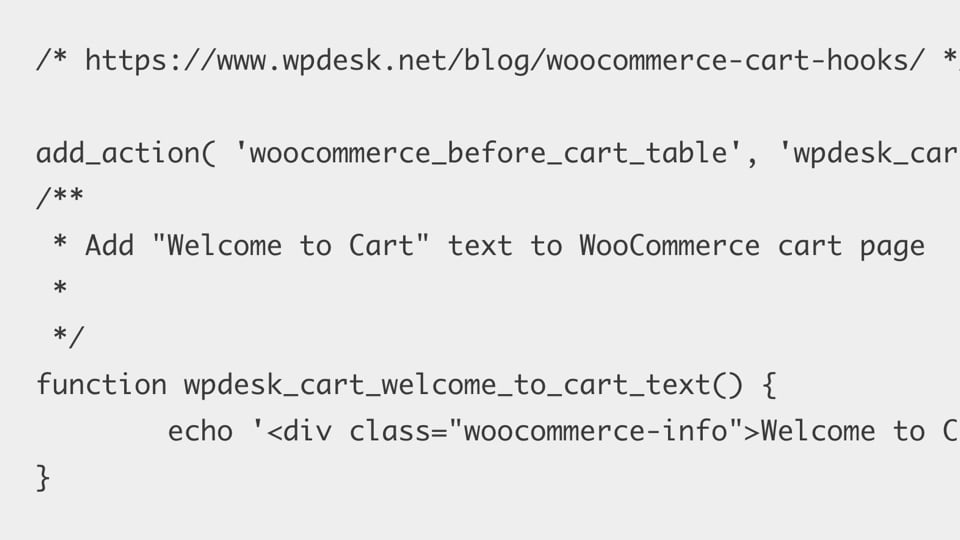
The “Add your own sections to the cart page” in WPDesk’s WooCommerce Cart Hooks article is very helpful in learning how add_action hooks code works in functions.php file. WPDesk’s “WooCommerce Empty Cart Hooks – Visual Guide” is also especially helpful. In the above code, WPDesk helps me see that the first part (woocommerce_before_cart_table) is the…
(Version 1.7.0): After following instructions from Affinity Photo: Extract/Cut Out an Image and Selection with the Selection Brush in Affinity Photo, under Refine Selection I chose Output > New Layer with Mask. OK, but now how do I re-select the selection (that I turned into a Mask) to edit the Mask further? Two options: Click…